# Webhooks
> Send signed LearnHouse webhook events to your own server, verify HMAC-SHA256 signatures, handle retries and manage endpoints from the dashboard or API.
Webhooks deliver real-time event notifications to any endpoint you control. When something happens in LearnHouse, such as a learner completing a course, a user signing up, or an assignment being graded, LearnHouse sends a signed `POST` request with a JSON payload to every matching endpoint. Use them to sync a CRM, send custom emails, update a dashboard or start any workflow without polling the API.
> Webhooks are available on the **Pro plan** or higher. Manage endpoints under **Developers → Automations** in the organization dashboard, or through the [REST API](#api-reference) while signed in. API tokens cannot manage webhooks.
>
## How it works
1. You register an **endpoint** (a public URL) and choose which events it receives.
2. When one of those events fires, LearnHouse sends a `POST` to your URL with a JSON body, **signed** with the endpoint's secret.
3. Your receiver **verifies the signature**, then handles the event.
4. If your endpoint doesn't return a `2xx`, LearnHouse **retries**, and it logs every attempt.
## Quick start
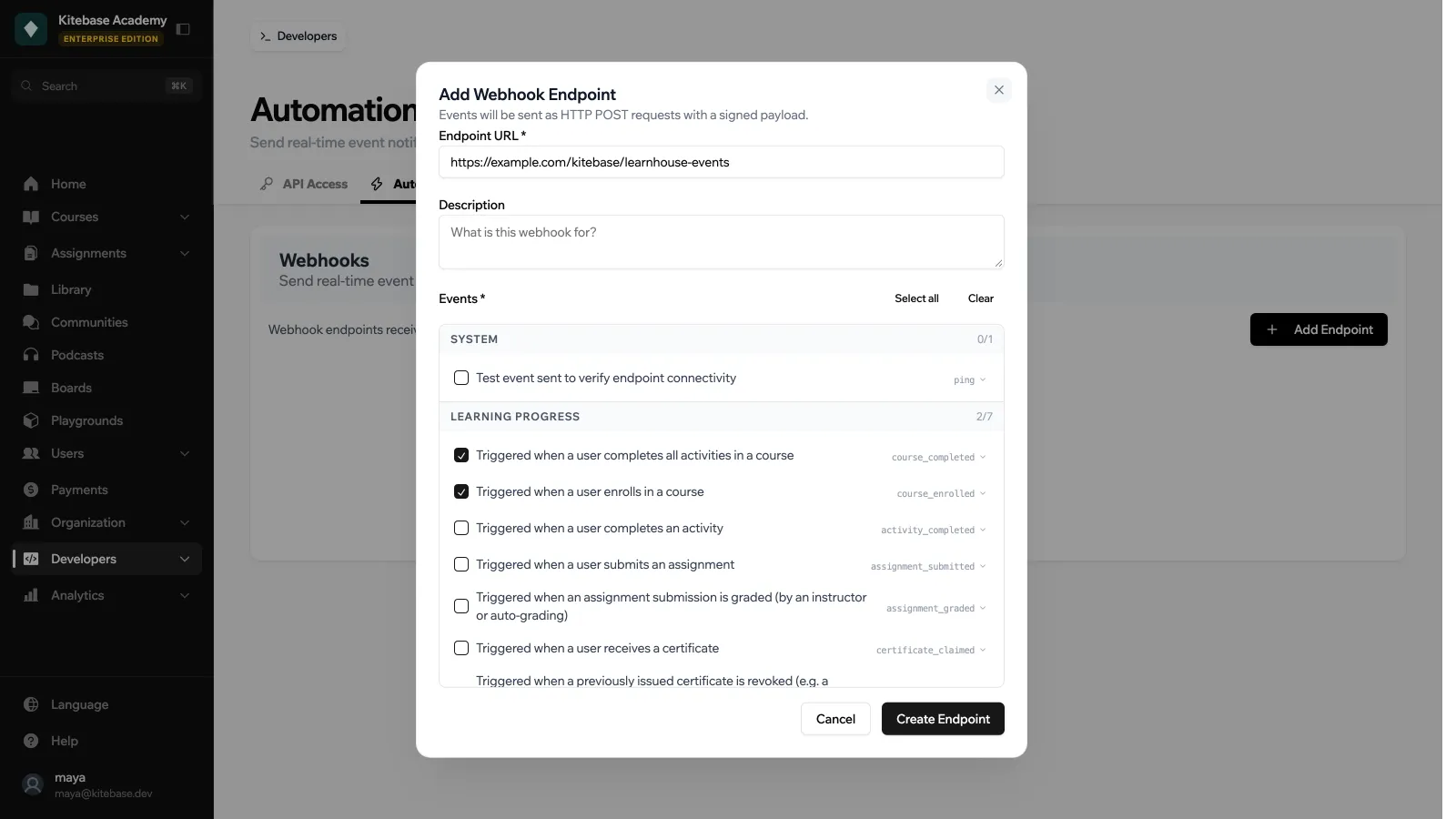
1. In the dashboard go to **Developers → Automations** and click **Add Endpoint**.
2. Enter the **Endpoint URL**. It must resolve to a public address, so `localhost` and private IPs are refused. Use `https://` in production. `http://` is accepted, but payloads then travel unencrypted. To test a server on your machine, expose it through a tunnel.
3. Add an optional **Description** and select the **Events** you want. **Select all** and **Clear** help with long lists. See the [Event Catalogue](https://docs.learnhouse.app/platform/automations/events) for the full list.
4. Click **Create Endpoint**. The **Signing Secret** is shown **once** on the next screen, so copy it into your server's secret store before you click **Done**.
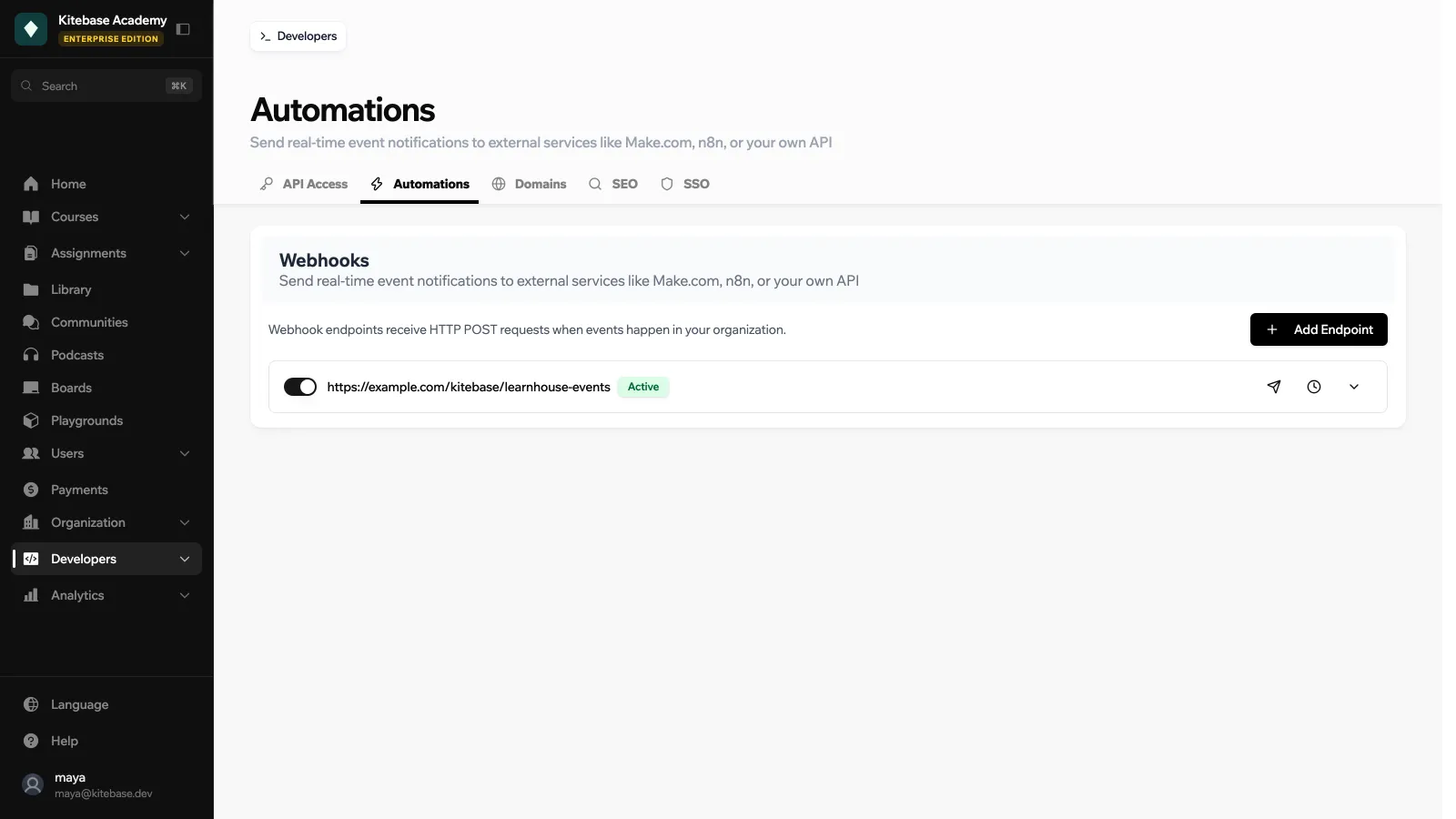
5. On the endpoint's card, click the **Send test event** icon to deliver a `ping` payload and confirm your server is reachable. Test events only reach active endpoints.
 Each endpoint card has a switch to make it **Active** or **Inactive**. Expand the card to see its events and to **Edit**, **Rotate Secret** or **Delete** it.
 ### Limits
- At most **20 endpoints per organization**. Endpoints created by Zapier count toward this limit.
- Creating endpoints and sending test events share a rate limit of **20 per hour** per organization.
- Creating, updating and rotating secrets need a role that can update the organization.
## Payload format
Every delivery has the same outer envelope:
```json
{
"event": "course_completed",
"delivery_id": "dlv_9f1e3c7b22a44f0d",
"timestamp": "2026-04-19T14:31:02Z",
"org_id": 1,
"data": {
"user": {
"user_uuid": "user_abc",
"email": "alice@example.com",
"username": "alice"
},
"course": {
"course_uuid": "course_xyz",
"name": "Intro to Python"
}
}
}
```
The shape of `data` varies per event. See the [Event Catalogue](https://docs.learnhouse.app/platform/automations/events) for the canonical schema of every event.
### Headers
| Header | Value |
| --- | --- |
| `Content-Type` | `application/json` |
| `User-Agent` | `LearnHouse-Webhooks/1.0` |
| `X-Webhook-Event` | Event name (e.g. `course_completed`) |
| `X-Webhook-Delivery` | Unique delivery ID (matches `delivery_id` in the body) |
| `X-Webhook-Signature` | `sha256=`, the HMAC-SHA256 of the raw body |
| `Accept-Encoding` | `identity` |
## Verifying the signature
LearnHouse signs every payload with HMAC-SHA256, using the endpoint's signing secret. The signature covers the **raw request body** (exactly the bytes sent over the wire, before any JSON parsing) and is delivered in the `X-Webhook-Signature` header as `sha256=`. GitHub and Stripe use the same convention.
> Always verify the signature before trusting a payload. Anyone who discovers your endpoint URL can send unsigned requests. The signature is the only thing that proves the request came from LearnHouse.
**Next.js**
A complete receiver as a Next.js Route Handler:
```ts title="app/api/webhooks/learnhouse/route.ts"
import { NextRequest, NextResponse } from 'next/server'
import crypto from 'node:crypto'
const SECRET = process.env.LEARNHOUSE_WEBHOOK_SECRET! // the whsec_… value
export async function POST(req: NextRequest) {
// 1. Read the raw body. Do not call req.json() first.
const raw = await req.text()
const signature = req.headers.get('x-webhook-signature') ?? ''
// 2. Recompute the HMAC and compare in constant time.
const expected =
'sha256=' + crypto.createHmac('sha256', SECRET).update(raw).digest('hex')
const valid =
signature.length === expected.length &&
crypto.timingSafeEqual(Buffer.from(signature), Buffer.from(expected))
if (!valid) {
return NextResponse.json({ error: 'invalid signature' }, { status: 401 })
}
// 3. Now it's safe to parse and handle.
const payload = JSON.parse(raw)
switch (payload.event) {
case 'course_completed':
console.log(`${payload.data.user.email} finished ${payload.data.course.name}`)
break
case 'user_signed_up':
// add to your mailing list
break
}
// 4. Return 2xx quickly so LearnHouse marks the delivery successful.
return NextResponse.json({ received: true })
}
```
**Node.js**
```js
import crypto from 'node:crypto'
function verifyWebhook(rawBody, signatureHeader, secret) {
const expected = 'sha256=' + crypto
.createHmac('sha256', secret)
.update(rawBody)
.digest('hex')
// timingSafeEqual throws if lengths differ, so check first.
const a = Buffer.from(signatureHeader ?? '')
const b = Buffer.from(expected)
return a.length === b.length && crypto.timingSafeEqual(a, b)
}
```
**Python**
```python
import hmac
import hashlib
def verify_webhook(raw_body: bytes, signature_header: str, secret: str) -> bool:
expected = "sha256=" + hmac.new(
secret.encode(), raw_body, hashlib.sha256
).hexdigest()
return hmac.compare_digest(expected, signature_header)
```
> If your framework parses the body into a dict before you see it (Express without `express.raw`, FastAPI without the raw bytes, etc.), you must re-read the raw body. Re-serialising the parsed JSON produces a different byte sequence and the signature will not match.
## Delivery and retries
- **Transport**: `POST` with a 10-second timeout. Redirects are not followed.
- **Retries**: Up to **3 attempts** per event: the first try, then a retry after **1 s**, then a last one after **4 s**. Any non-2xx response, timeout, or network error triggers a retry.
- **Success**: A response with an HTTP status in `2xx` marks the delivery as successful and stops further retries.
- **Ordering**: Deliveries are fire-and-forget and may arrive slightly out of order under load. Use the `timestamp` field if you need strict ordering.
- **Delivery logs**: The most recent **200 attempts per endpoint** are retained. Each log entry records the HTTP status, the start of the response body (LearnHouse reads up to 8 KB and stores the first 500 characters), the attempt number, and any transport-level error.
- **Plan**: If the organization drops below the Pro plan, deliveries stop.
In the dashboard, the **View delivery logs** icon on an endpoint card opens **Delivery Logs** with the last 30 attempts (status, event, response, attempt and time). The API returns up to 200 through `GET /api/v1/orgs/{org_id}/webhooks/{webhook_uuid}/deliveries`.
## Your endpoint: what to return
- **Respond quickly.** LearnHouse uses a 10 s per-attempt timeout; if your handler does heavy work, enqueue a job and return `200` immediately.
- **Respond with any 2xx status.** Body content is ignored (but captured in the delivery log for debugging).
- **Be idempotent.** Deliveries are at-least-once: after a retry, the same `delivery_id` can arrive twice. Record the IDs you have processed and treat a repeat as a no-op.
- **Verify the signature.** Do this before any database write.
## Security
- **Schemes.** Only `https://` and `http://` URLs are accepted. Use `http://` for local testing only, since payloads would travel unencrypted.
- **Private address protection (SSRF guard).** LearnHouse resolves every webhook URL to an IP when you save it and again before every delivery, and refuses private and reserved ranges (`10.0.0.0/8`, `127.0.0.0/8`, `169.254.0.0/16`, `172.16.0.0/12`, `192.168.0.0/16`, `::1`, link-local, etc.) and `localhost`, in every environment. The check is repeated **after** the connection is established to defeat DNS rebinding.
- **Signing secret at rest.** Secrets start with `whsec_`. They are stored encrypted (Fernet, key derived from the application's JWT secret) and are returned in plaintext **only** at creation and when you rotate the secret. LearnHouse cannot recover a lost secret. You can only rotate it.
- **Scope.** A webhook endpoint is scoped to a single organization. It can only subscribe to events fired for that org.
## Regenerating a secret
If a secret leaks, expand the endpoint's card under **Developers → Automations** and click **Rotate Secret**, then **Regenerate**. The new secret is returned once and replaces the old one immediately. Every subsequent delivery will be signed with the new secret, so update your consumer before regenerating (or accept a brief window of rejected signatures while you roll out the change).
## API reference
All endpoints require a signed-in session (API tokens are rejected), the Pro plan, and are scoped to `org_id`. Creating, updating and rotating need a role that can update the organization.
### List available events
```http
GET /api/v1/orgs/{org_id}/webhooks/events
```
Returns the full catalogue of event names, categories, descriptions, and data schemas. This is the same data shown in the Event Catalogue.
### Create an endpoint
```http
POST /api/v1/orgs/{org_id}/webhooks
Content-Type: application/json
{
"url": "https://example.com/hooks/learnhouse",
"description": "Main backend",
"events": ["course_completed", "user_signed_up"]
}
```
Response (200):
```json
{
"webhook_uuid": "webhook_b5f2…",
"url": "https://example.com/hooks/learnhouse",
"description": "Main backend",
"events": ["course_completed", "user_signed_up"],
"is_active": true,
"secret": "whsec_…",
"created_by_user_id": 1,
"creation_date": "2026-04-19 14:31:02"
}
```
> The `secret` is returned **only on this response**. Store it immediately, because it cannot be retrieved again.
### List endpoints
```http
GET /api/v1/orgs/{org_id}/webhooks
```
### Get an endpoint
```http
GET /api/v1/orgs/{org_id}/webhooks/{webhook_uuid}
```
### Update an endpoint
```http
PUT /api/v1/orgs/{org_id}/webhooks/{webhook_uuid}
Content-Type: application/json
{
"url": "https://example.com/hooks/v2",
"events": ["course_completed"],
"is_active": true
}
```
All fields are optional; omit to leave unchanged.
### Delete an endpoint
```http
DELETE /api/v1/orgs/{org_id}/webhooks/{webhook_uuid}
```
Deletes the endpoint **and** all of its delivery logs.
### Regenerate the signing secret
```http
POST /api/v1/orgs/{org_id}/webhooks/{webhook_uuid}/regenerate-secret
```
Returns a `WebhookEndpointCreatedResponse` with the fresh `secret`. Subsequent deliveries use the new secret immediately.
### Send a test event
```http
POST /api/v1/orgs/{org_id}/webhooks/{webhook_uuid}/test
```
Delivers a synthetic `ping` event:
```json
{
"event": "ping",
"delivery_id": "dlv_…",
"timestamp": "2026-04-19T14:31:02Z",
"org_id": 1,
"data": { "message": "This is a test webhook event from LearnHouse." }
}
```
### List delivery logs
```http
GET /api/v1/orgs/{org_id}/webhooks/{webhook_uuid}/deliveries?limit=50
```
Returns up to `limit` of the most recent delivery attempts (default 50, maximum 200), each including HTTP status, truncated response body, attempt number, and error message when applicable.