# Learning Paths
> Build a learning path from your courses with required and elective courses, guided order and a path certificate, then follow learners' progress through it.
A learning path is an ordered set of courses that learners follow from start to finish. It can mix required and elective courses, unlock them one at a time, and award its own certificate when the learner is done. The courses stay normal courses: a path only groups them and tracks progress across them.
> Learning paths need the **Pro** plan or higher on LearnHouse Cloud. They are included on every self-hosted instance. Creating and editing paths needs a role with the **create** and **update** rights on courses (Admin and Maintainer by default). Path certificates keep verifying even if the organization later moves to a lower plan.
>
## Creating a path
### Create it
Go to **Paths** in the dashboard sidebar and click **New path**. Enter a **Name** and a **Short description** (shown on the path card). **Visible to everyone, not only members** is on by default. Click **Create path**.
The path opens on its **Courses** tab. It starts as a **Draft**, so learners cannot see it yet.
### Add the courses
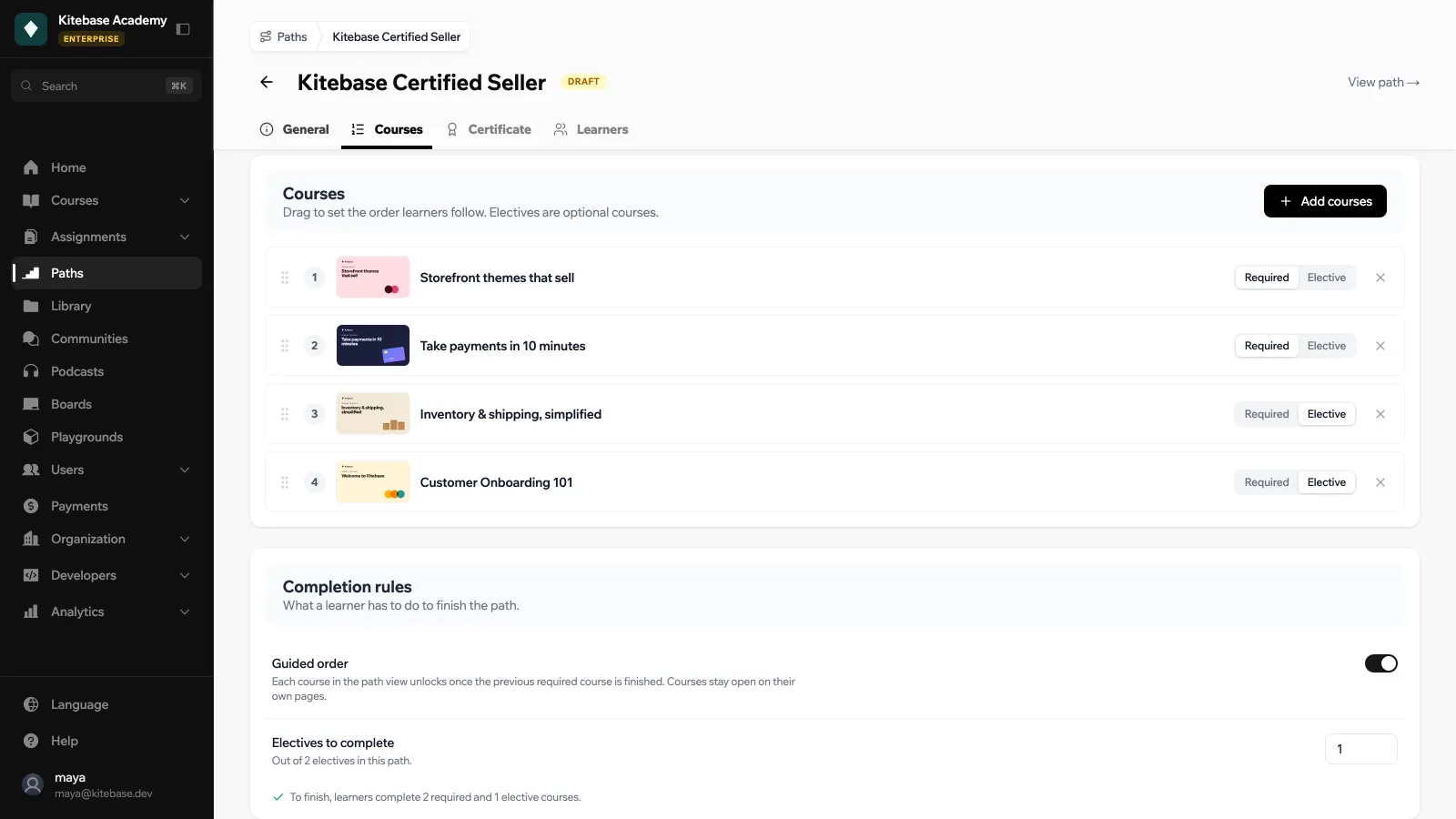
Click **Add courses**, pick courses from your organization and confirm with the **Add** button (for example **Add 4 courses**). They are added in the order you pick them. Drag a course by its handle to move it, or click **Remove from path** to take it out. A path holds up to 100 courses, and each course can appear once.
For each course, choose **Required** or **Elective**. Unpublished courses are marked **Unpublished, hidden from learners** and do not count toward completion until you publish them.
### Set the completion rules
Under **Completion rules**:
| Setting | What it does |
| --- | --- |
| **Guided order** | Each course in the path view unlocks once the previous required course is finished. The courses stay open on their own pages; only the path view is locked. |
| **Electives to complete** | How many elective courses a learner must finish on top of the required ones. `0` means electives never count. |
A summary line shows the rule, for example "To finish, learners complete 2 required and 1 elective courses."
 ### Fill in the details and publish
On the **General** tab, set a **Cover image** (16:9 works best, PNG or JPG), the **Name**, the **Short description**, an **About** text shown on the path page, and a **Level**: **All levels**, **Beginner**, **Intermediate** or **Advanced**.
Under **Visibility**, tick **Published** so learners can find and start the path. Leave **Public** on to show it to visitors who are not members of your organization, or turn it off to keep it for members. Click **Save changes**.
Use **View path** at the top of the editor to open the path as learners see it. From the path list in the dashboard, each card has a menu with **Settings**, **Edit courses** and **Delete path**.
> Deleting a path removes it with its learners' progress and its path certificates. The courses themselves are not touched.
## When a path is complete
A learner completes a path when they have finished every published required course, plus the number of electives you set. A course counts as finished under the same rule as a [course certificate](https://docs.learnhouse.app/platform/certifications#when-a-certificate-is-awarded): every published activity is done and every graded assignment is passed.
Work done before the learner started the path counts. A learner who has already finished every course completes the path, and gets its certificate, the moment they start it.
## The path certificate
On the **Certificate** tab, click **Award a certificate**, then set it up with the same designer as course certificates: a name, a description, a type, an optional signer and a style. The fields are described in [Setting up a course certificate](https://docs.learnhouse.app/platform/certifications#setting-up-a-course-certificate). The live preview shows the certificate with your organization's logo and name. Click **Save changes**.
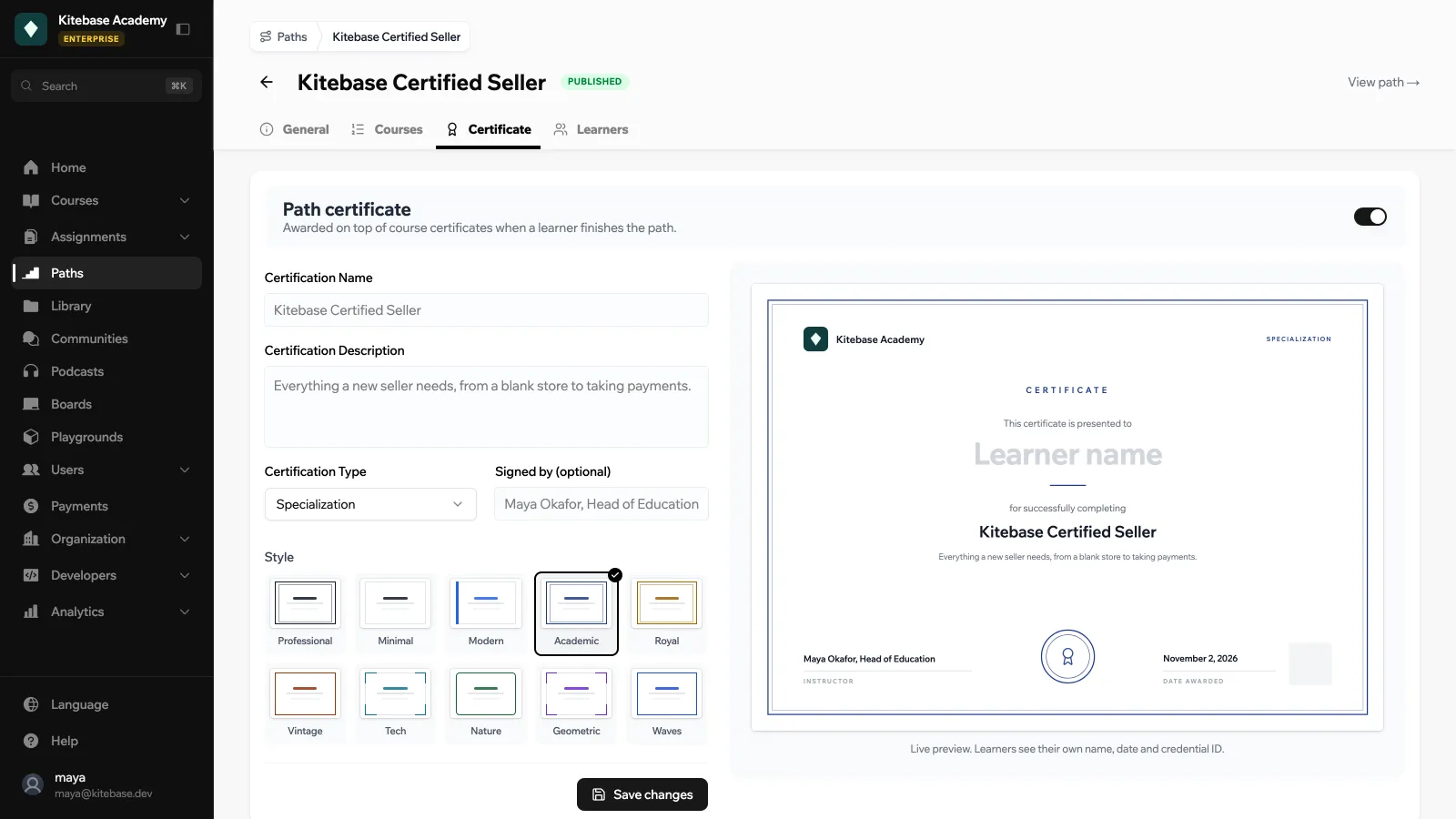 The path certificate is awarded on top of the course certificates. If you turn it on after some learners have already completed the path, they get it the next time their progress is checked.
Each path certificate has an ID like `PATH-20261102-d68d-2d61e7cd` and a public verification page at `/paths/certificate/{id}`, which works for anyone with the link. See [Certifications](https://docs.learnhouse.app/platform/certifications#path-certificates) for what that page shows.
## What learners see
Paths get their own page in your public menu, **Paths**, with a search box. You can rename, reorder or hide the link from [Menu](https://docs.learnhouse.app/platform/organizations/settings#menu).
A path page shows the cover, the number of courses, the level, **Guided order** when it is on, the about text and **Courses in this path**. When the path awards a certificate, a **Certificate included** card shows a preview of it.
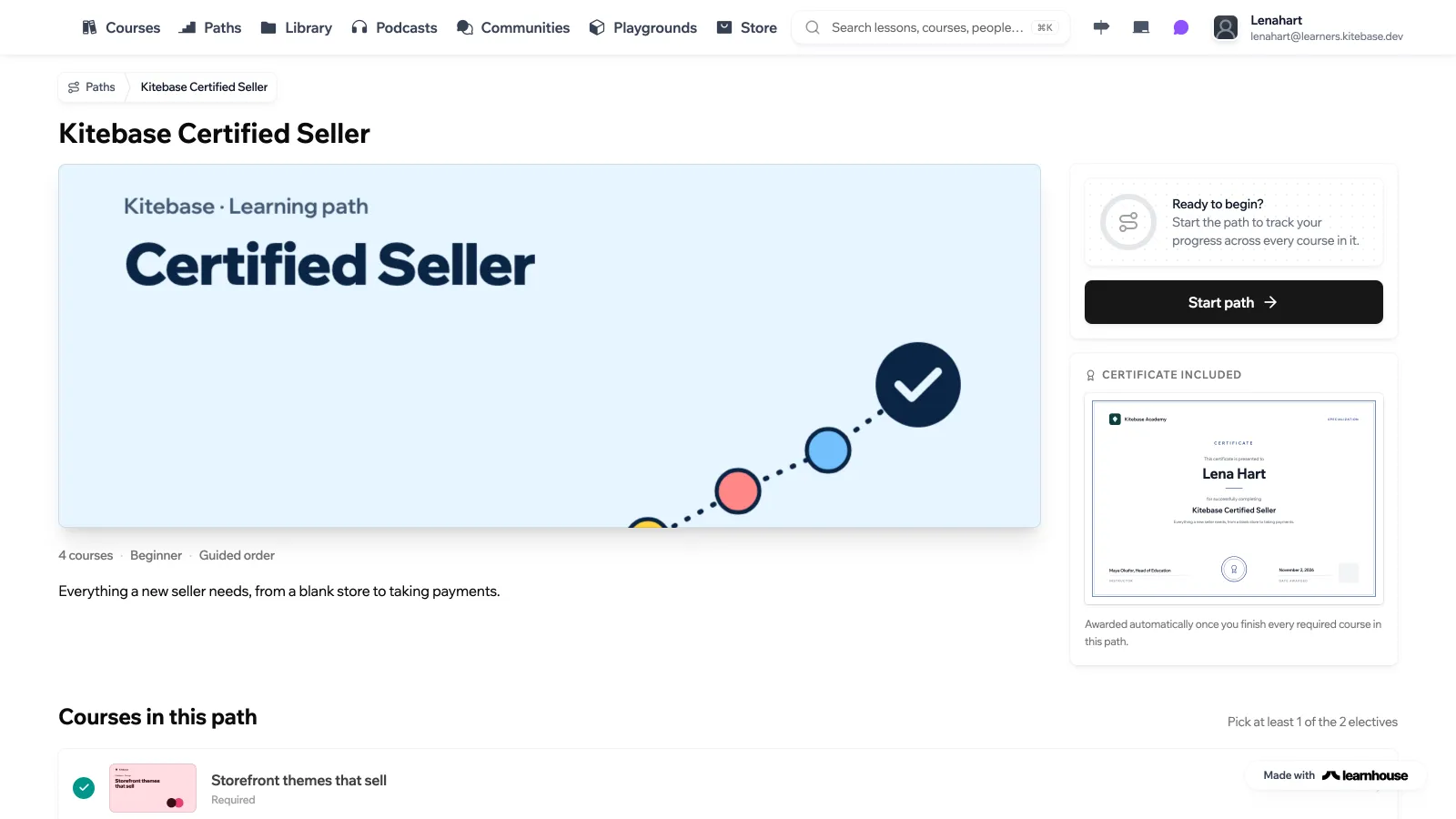 1. The learner clicks **Start path**. Visitors who are not signed in see **Sign in to start**.
2. **Your progress** shows how many of the courses that count are done. **Continue learning** opens the next course.
3. In the course list, finished courses get a check mark and the next one is marked **Up next**. With **Guided order** on, later courses show **Finish the previous course to unlock**. Courses the learner cannot open, for example ones limited to a [user group](https://docs.learnhouse.app/platform/users/user-groups), show as **Restricted course**.
4. Once the path is done, the card shows **Completed** and **View certificate**.
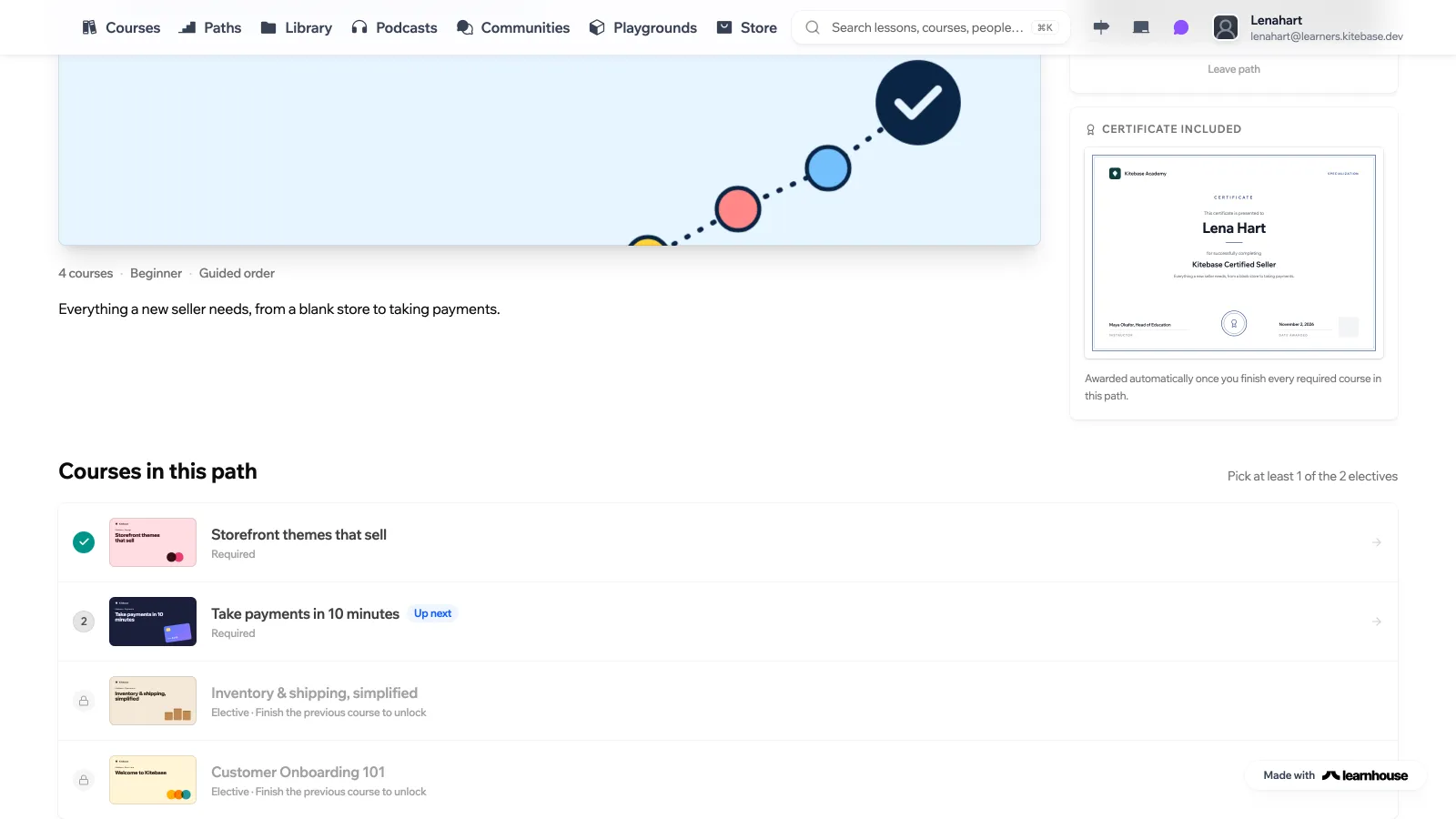 **Leave path** stops tracking the path for that learner. A certificate they already earned is kept.
Paths also show up in other places:
- A course page lists the paths it belongs to under **Part of a path**.
- The learner's [Progress page](https://docs.learnhouse.app/platform/courses/trails) lists **My paths**, and path certificates appear under **My Certificates** next to course certificates.
## Following learners
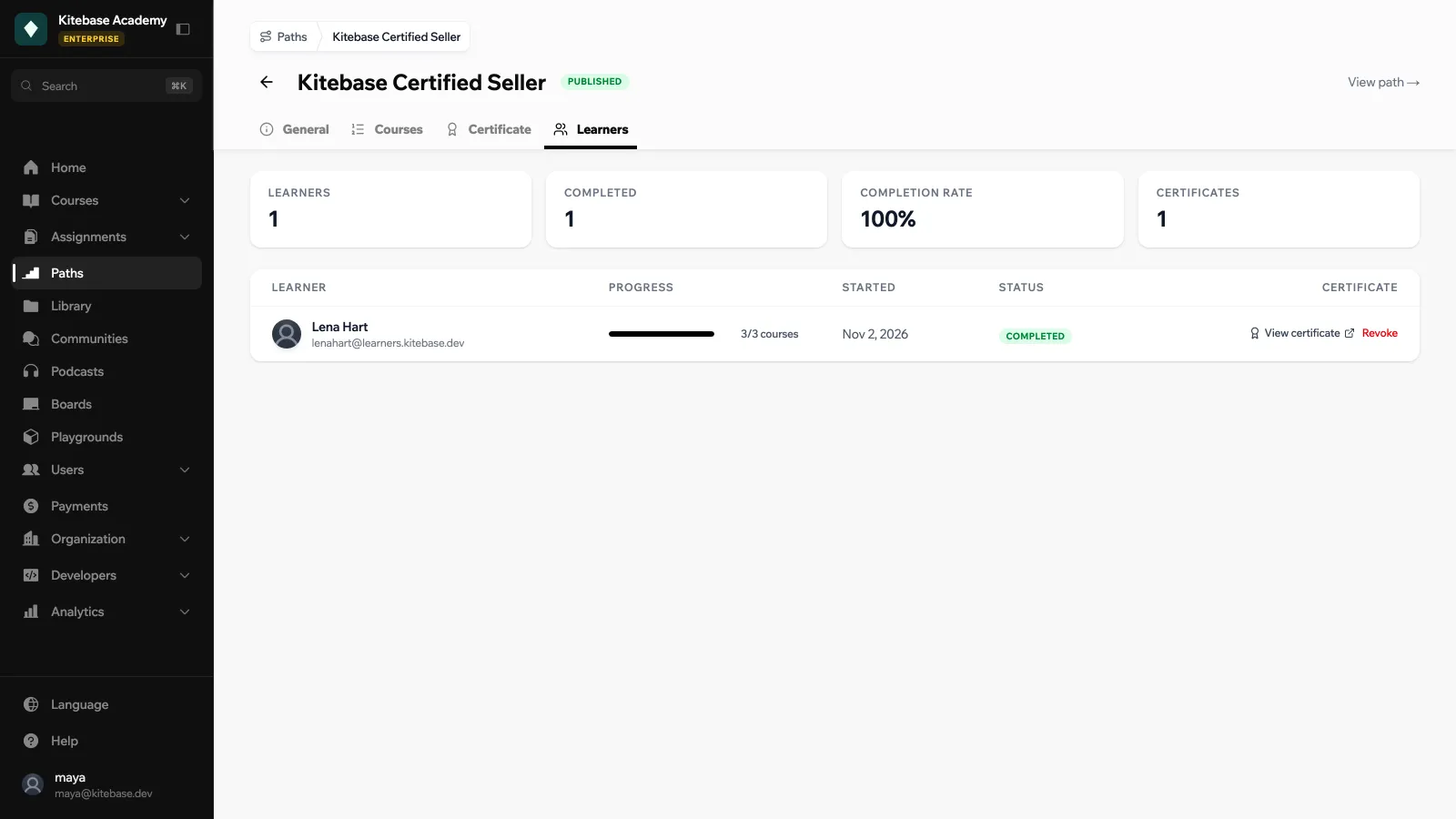
The **Learners** tab shows everyone who started the path. At the top are the number of **Learners**, how many **Completed**, the **Completion rate** and the number of **Certificates** issued. The table lists each learner with their **Progress**, the date they **Started**, their **Status** (**In progress** or **Completed**) and their **Certificate**.
 ### Revoking and reinstating a certificate
Click **Revoke** next to a certificate to withdraw it. It stops verifying right away and the row shows **Revoked**. A revoked certificate is not issued again automatically, even if the learner leaves and restarts the path.
Click **Reinstate** to undo it. The same certificate, with its original ID and date, verifies again.
## Webhooks
Paths fire two [events](https://docs.learnhouse.app/platform/automations/events#path_enrolled): `path_enrolled` when a learner starts a path, and `path_completed` when they finish it, with the certificate ID when the path awards one.
## API
The paths API lives under `/api/v1/paths`. [API tokens](https://docs.learnhouse.app/developers/api/authentication) with course rights can create, edit and delete paths, set their courses, list their learners and revoke or reinstate certificates. Starting and leaving a path need a signed-in user.